
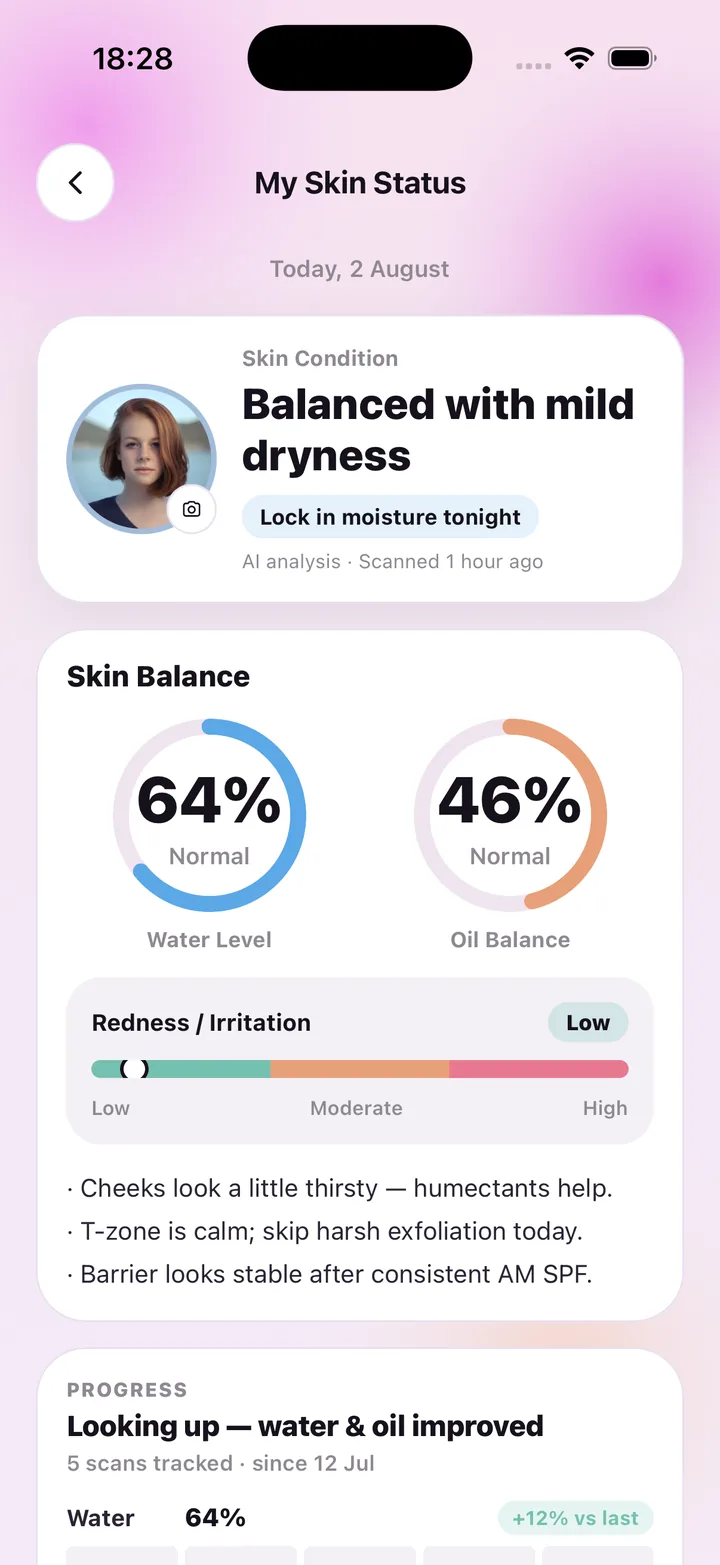
What the AI skin analysis looks at
The analysis is built around three things you can actually act on in a skincare routine: how hydrated the skin looks, how oily it looks, and how much redness or irritation is visible. Each becomes a reading — a water level percentage, an oil balance percentage and a redness scale from low to high — and together they get a plain-language label such as "Balanced with mild dryness".
Under the readings you get two or three short notes in everyday words: cheeks look a little thirsty, humectants help; T-zone is calm, skip harsh exfoliation today. That is the point of the analysis — not a score for its own sake, but a small, specific next step for tonight or tomorrow morning.
How a scan works
Open Face scan, line your face up inside the guides and take the selfie in soft daylight, or choose a photo from your library. The photo is sent over an encrypted connection to our AI processor, which returns a structured description. A few seconds later My Skin Status updates with the new readings, the label and the notes.
Each face scan uses one AI scan from your plan, and the screen tells you how many you have left this period. Re-opening an old result, checking off routine steps or browsing your shelf never uses a scan.
- Water level and oil balance shown as percentages with a Normal / OK range
- Redness and irritation on a low – moderate – high scale
- A short condition label and two or three practical notes
- Every result saved to your history so the next scan has something to compare against
- Sources and references for the guidance listed in Settings and under each result
What it deliberately is not
Every reading is general skincare wellness guidance, not a medical diagnosis. SkinCare AI does not identify, treat or prevent any condition; if something on your skin worries you, see a dermatologist.
The app also does not build a faceprint or any biometric template. The selfie is a picture used once to produce the readings, then kept with your account only so you can revisit that result. You can erase every scan photo from Settings at any time.
From analysis to routine
Readings are only useful if they change what you do. After a scan, the home screen shows your glow snapshot next to today's morning and evening checklist, so the note "lock in moisture tonight" sits right beside the step where you would do it. Scan again in a week or two and the progress panel shows how water, oil and redness moved.
Frequently asked questions
Is AI skin analysis accurate?
It describes how your skin appears in one photo under the light you took it in. Soft, even daylight and a clean lens give the most consistent readings, and comparing scans taken in similar conditions is more meaningful than any single number. It is wellness guidance, not a clinical measurement.
Can the AI tell me what skin condition I have?
No. The app does not identify, diagnose or treat conditions. It reports hydration, oil and redness as they look in the photo and suggests general care steps. For any concern, consult a dermatologist.
How many scans do I get?
Weekly includes 7 AI scans, Monthly 30 and Monthly Pro 100 per billing period. Face scans and product scans each count as one.
Where does my photo go?
It is uploaded over TLS to our API and passed to our AI processor, OpenAI, which does not train on it. Photos are stored encrypted in the EU and you can delete them all from Settings → AI & photo data.
SkinCare AI provides general skincare wellness guidance only. Skin scan results are not a medical diagnosis and the app does not treat or prevent any condition. If you have a skin concern, consult a dermatologist or another qualified professional.