
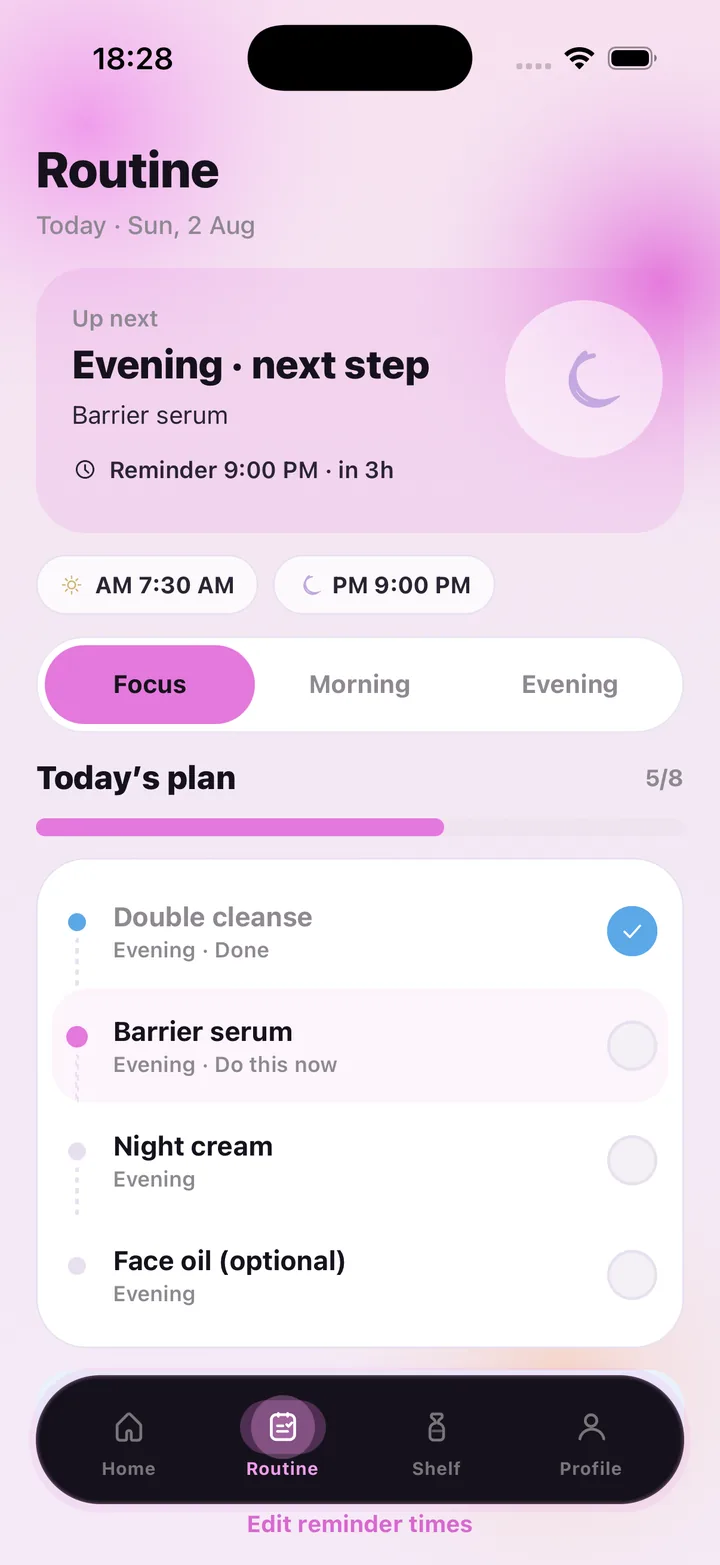
Your AM and PM plan on one screen
The Routine tab opens on "Up next": the next ritual, its first step and when the reminder fires — "Evening · Barrier serum · Reminder 9:00 PM · in 3h". Below it sit your two reminder times, a Focus / Morning / Evening switch and Today's plan, a checklist with a progress bar that fills as you go.
Each step shows its ritual and state — Done, Do this now, or upcoming — so you always know where you are. Optional steps are marked as optional, because a face oil you skip on a busy night should not break the habit.
Steps that adapt to your scan
A routine app on its own tells you what to do; a face scan tells you why. After a scan, the notes — "cheeks look a little thirsty, humectants help" — appear next to your plan, and product suggestions can be matched to your latest readings. The routine stays yours; the scan just points at the step worth paying attention to tonight.
- Morning and evening checklists with your own steps
- Reminder times you set (for example AM 7:30 · PM 9:00), editable any time
- Progress bar and done count for today (5 / 8 steps)
- Home screen summary: AM 4/4 · PM 1/4 and your day streak
- Check-offs and reminders never use an AI scan
Consistency you can see
The home screen keeps a week strip and a running day streak, so a good stretch is visible and a missed evening is just a gap, not a reset of everything you know. Scan again every week or two and the progress panel shows whether water, oil and redness are moving the way you hoped.
Every reading is general skincare wellness guidance, not a medical diagnosis. SkinCare AI does not identify, treat or prevent any condition; if something on your skin worries you, see a dermatologist.
Plans
The routine, reminders and shelf come with any plan. AI face and product scans are what the subscription meters: Weekly $4.99 with 7 scans, Monthly $9.99 with 30, Monthly Pro $29.99 with 100 per period. Restore purchases any time.
Frequently asked questions
Can I build my own routine steps?
Yes. Morning and evening lists hold your own steps, and you can mark some as optional. Reminder times are yours to set and edit.
Does checking off steps use my scans?
No. Only AI face scans and product packaging scans count. Routine logging is always included.
Will I get notifications?
Yes — a local reminder fires at the morning and evening times you choose. You can change them from the Routine tab with "Edit reminder times".
Do I need to scan my face to use the routine?
The routine works on its own. A scan adds notes and product suggestions matched to how your skin currently looks, which most people find makes the steps easier to stick to.
SkinCare AI provides general skincare wellness guidance only. Skin scan results are not a medical diagnosis and the app does not treat or prevent any condition. If you have a skin concern, consult a dermatologist or another qualified professional.