
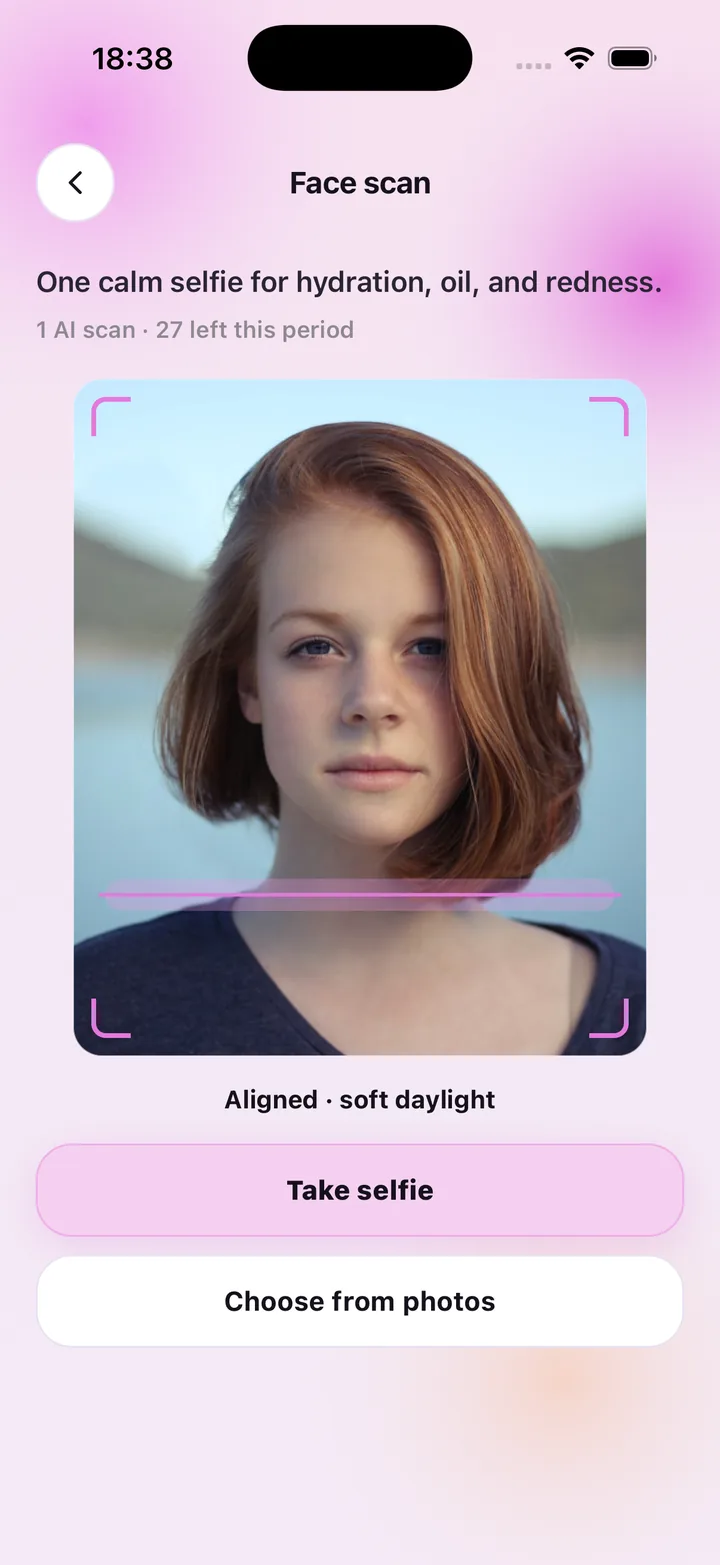
Face scan: one selfie, three readings
The face scanner is designed to be calm and quick. Framing guides help you line up, a hint tells you whether you are aligned and in soft daylight, and one tap takes the selfie. The AI returns a water level, an oil balance and a redness scale, plus a short label like "Balanced with mild dryness" and a couple of practical notes.
You do not need special hardware or a mirror attachment. It works with the front camera or with a photo you already have. The result lands on My Skin Status, where it is saved next to your earlier scans.
Product scan: know what is on the bottle
The second scanner reads packaging. Aim at the ingredient list on a cleanser, serum or sunscreen and the app extracts the ingredients into a product card on your shelf — name, brand, the ingredient tags and, if you set it, the period-after-opening days so you know how long the product stays good once opened.
Because your shelf and your latest face scan live in the same app, the product suggestions you see can be matched to what your most recent scan showed.
- Face scan: hydration, oil, redness, condition label and notes
- Product scan: ingredients pulled from packaging into your shelf
- Both scans count as one AI scan each; everything else is free within your plan
- Remaining scans for the period shown before you start
- Delete scan photos at any time from Settings
What the scanner does not claim
Every reading is general skincare wellness guidance, not a medical diagnosis. SkinCare AI does not identify, treat or prevent any condition; if something on your skin worries you, see a dermatologist.
It is also not a face-recognition tool. No faceprint or face-geometry template is created, and a photo is never used to identify anyone. The selfie exists to produce the readings and to let you revisit them.
Scans that lead somewhere
Scanning is the input; the routine is the output. After a scan, the home screen puts your readings next to today's AM and PM checklist and the next reminder, so a note like "skip harsh exfoliation today" is right where you plan your evening. Scan again later and the progress panel shows the change.
Frequently asked questions
Do I need a subscription to use the scanner?
Yes. AI face and product scans require a plan — Weekly $4.99 (7 scans), Monthly $9.99 (30) or Monthly Pro $29.99 (100). Routines, reminders and your shelf are included with any plan and never use scans.
Does the skin scanner detect skin problems?
No. It reports how hydrated, oily and red your skin looks in the photo and offers general care notes. It does not identify or diagnose any condition. See a dermatologist for concerns.
Can I scan a photo from my library instead of taking one?
Yes. Face scan offers both Take selfie and Choose from photos.
What lighting works best?
Soft, even daylight facing a window, with no strong shadows. The scan screen shows an alignment hint before you shoot.
SkinCare AI provides general skincare wellness guidance only. Skin scan results are not a medical diagnosis and the app does not treat or prevent any condition. If you have a skin concern, consult a dermatologist or another qualified professional.